AI Translation System for 62+ Languages
Designed an AI-assisted translation workflow at Entromy, enabling enterprise survey launches across 62+ languages.
B2B · AI · Reduced CS support
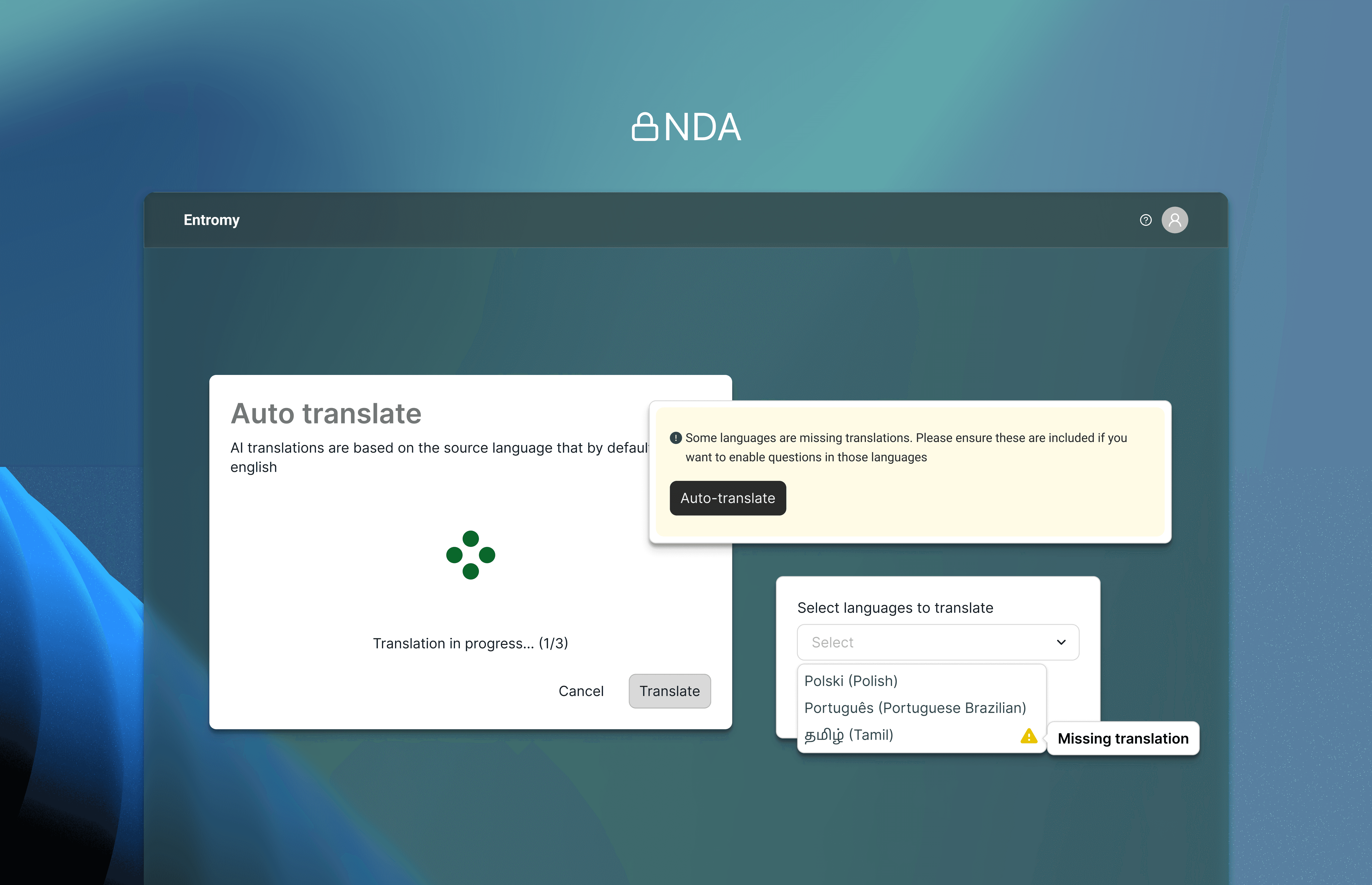
Project summary
Role: Product Designer at Entromy.com
Team: 1 product designer, 1 PM, 1 Engineer, 2 QA
Timeline: 2025
Platform: Web
Entromy is a B2B SaaS platform used by private equity and enterprise teams to run organizational health surveys, value creation assessments, and 360º feedback globally. I worked as the Product Designer on a lean cross-functional team, owning problem framing, success criteria, and the end-to-end UX design of an AI-assisted auto-translation workflow.
The goal was to centralize translation work inside the product while balancing automation with trust, predictability, and enterprise-scale workflows.
Context and constraints
Enterprise clients routinely ran surveys across multiple regions and languages:
Companies with 1,000+ employees
Assessments distributed to 1,500+ participants
Surveys launched in 4–10+ languages simultaneously
While the platform supported over 62 languages, translation work happened outside the product (spreadsheets, agencies, Google Translate). Any late change to English content invalidated all translations, causing rework, errors, and heavy Customer Success involvement.
Constraints included:
Limited tolerance for translation errors
High operational risk from silent desynchronization
AI cost and reliability considerations
The need for consistency across surveys and demographics
Problem
Translation was treated as a one-time task instead of an ongoing workflow.
Key issues:
Late English changes invalidated all translations
No visibility into missing or outdated languages
High manual effort and Customer Success dependency
Low trust in automation for enterprise-critical content
The core question became:
How might we use AI to speed up translation without removing user control or introducing operational risk?
Key Insight
Users didn’t want “more AI.” They wanted predictable updates, clear ownership, and visibility.
For enterprise teams, translation accuracy and change management mattered more than speed or novelty.
Design decisions & solution
I deliberately avoided per-question or inline “magic” AI actions and designed a centralized, user-triggered auto-translation workflow.
Details are limited due to NDA
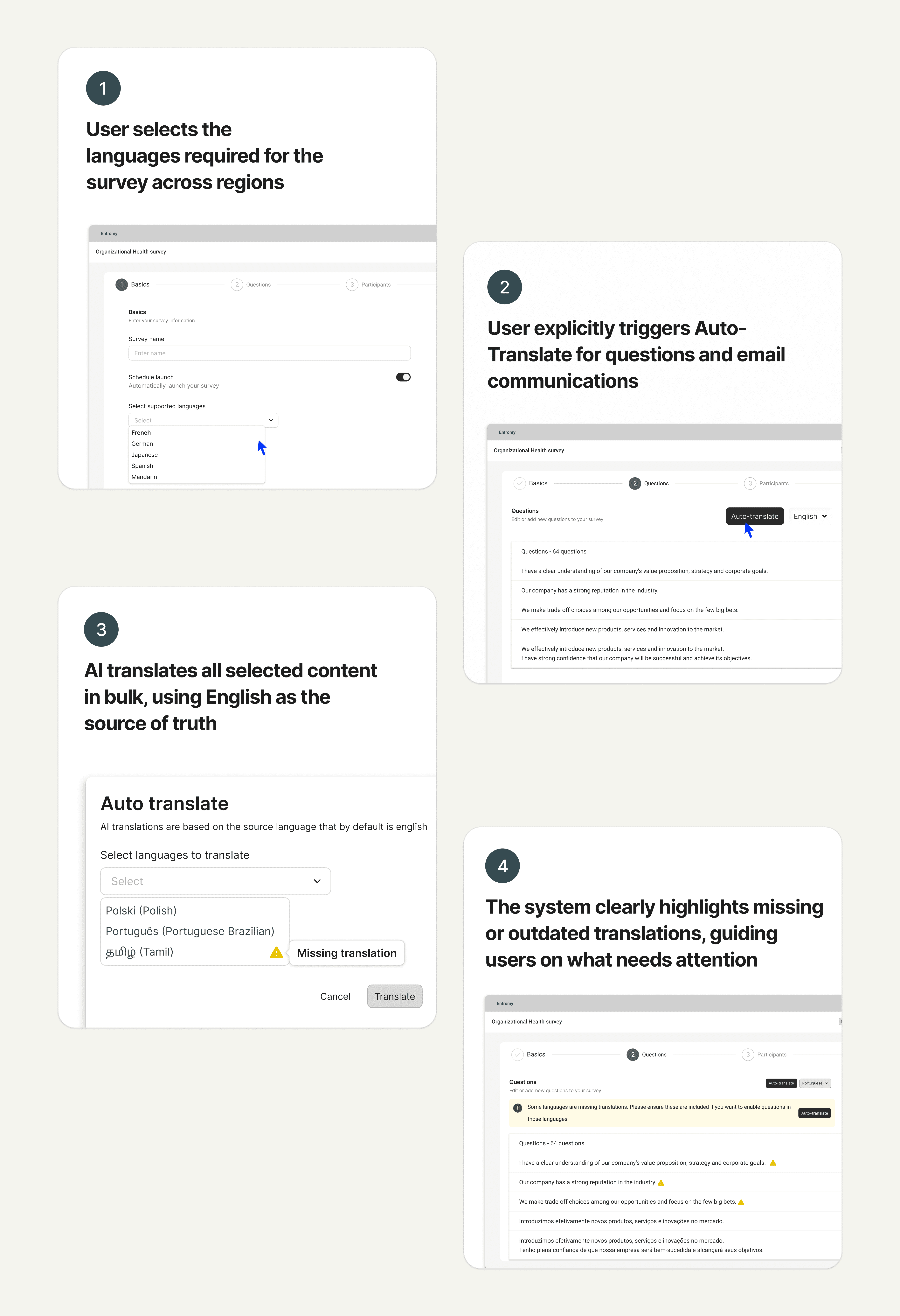
Key elements included:
Bulk AI auto-translate
Users explicitly selected target languages and triggered translation manually. Clear progress and completion states ensured AI never ran silently.English as the source of rruth
English content defined survey structure. Any post-translation change flagged existing translations as outdated, with a clear banner prompting re-translation.Missing translation visibility
Incomplete languages were clearly flagged. Users were guided to resolve gaps without being blocked, supporting partial readiness across regions.Pragmatic AI error handling
Rare failures were handled as mostly all-or-nothing cases with clear messaging. Partial-success logic was intentionally deferred in V1 to avoid confusion.
Constraints & Trade-offs
This project was not about “adding AI everywhere.”
Key trade-offs:
Cost: Per-question translation would significantly increase AI usage
UX complexity: Inline actions created unclear overwrite logic
Reliability: AI translation can fail or lack language support
Consistency: Behavior had to scale across surveys and launches
We chose a centralized, explicit workflow to reduce complexity, improve predictability, and align with enterprise expectations.
Outcomes
Translation workflows moved fully into the platform
Faster setup for multilingual enterprise surveys
Reduced Customer Success intervention for global rollouts
Positive adoption by large clients running high-scale assessments
(Details and metrics are limited due to NDA; outcomes were evaluated through adoption, operational feedback, and workflow stability.)
Reflection
This project reinforced that AI features succeed not when they are clever, but when they are explainable, predictable, and respectful of existing workflows.
In enterprise contexts, good UX is less about automation at all costs and more about helping teams move faster without losing confidence in the system. With increased usage and confidence, I would revisit partial-success handling and introduce deeper analytics to better support power users and global operating models.